Inside the Resume Rewriter: What Happens When You Upload Your Resume
A step-by-step look at what Role Ascent actually does to your resume — the ATS score, the keyword gap analysis, the rewrite, and the cover letter. Real outputs, not marketing promises.
Most resume tools tell you your resume is "good" or "needs improvement" without telling you anything specific. Role Ascent's Resume Rewriter does something different: it runs your resume and the job description through a structured analysis pipeline and gives you a rewritten document, a keyword gap report, an ATS score, and — optionally — a cover letter and selection criteria responses. All calibrated to your target APS band.
Here's exactly what you get.
Step 1: Paste Your Resume and the Job Description
You paste in the job description and your current resume (plain text — copied directly from your Word or PDF file). You select your target APS band and, optionally, your agency.
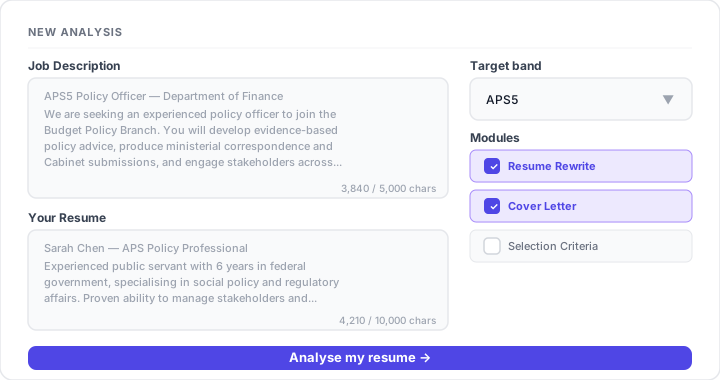
That's the entire input. No account setup, no template selection, no form to fill out about your experience. The AI reads both documents directly.
Step 2: The ATS Score (Before)
Before anything is rewritten, Role Ascent scores your current resume against the job description using the same keyword-matching logic that PageUp and similar ATS systems use.
The score is an integer from 0–100. It measures keyword overlap — how many of the key terms in the job description appear in your current resume, weighted by frequency and position.
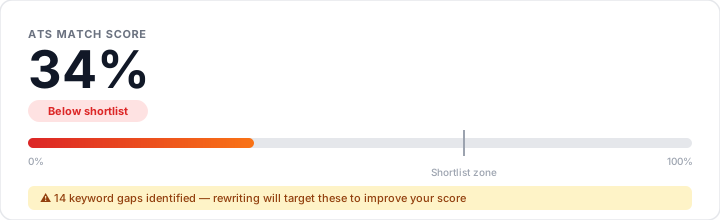
For most unoptimised resumes submitted to APS roles, the before score is 25–45%. That's the range where applications are likely declined before a human reviewer reads them. The goal is 65–80% — the range where human judgment takes over.
Step 3: The Keyword Gap Report
The rewriter identifies every term in the job description that's absent from your current resume. These are shown as a list of keyword gaps — the specific phrases the hiring panel used that your resume doesn't currently contain.
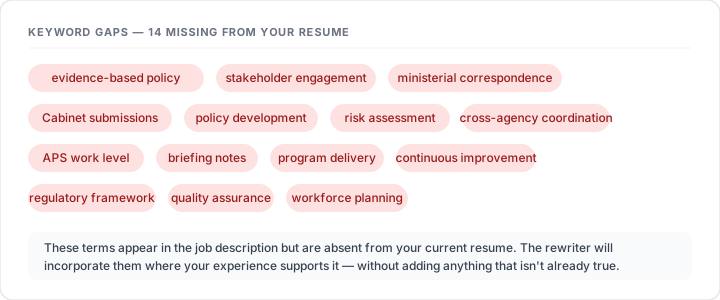
This tells you two things:
- What the ATS is penalising you for — each gap is a match the system couldn't make
- What the hiring panel considers core to the role — these terms appear in the JD because the panel put them there
The gaps aren't suggestions to stuff into your resume. The rewriter uses them to calibrate the language of the rewritten version — only replacing your wording with JD-aligned language where you've actually done the described work.
Step 4: The Rewritten Resume
The rewrite is the core output. It's your resume — your jobs, your dates, your responsibilities — rewritten using the language of the job description.
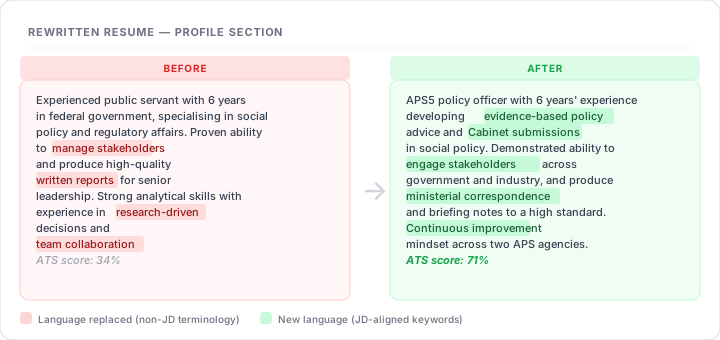
What changes:
- Verb choices — "managed" becomes "led", "helped with" becomes "developed"
- Terminology — your vocabulary aligned to the JD's exact phrasing
- Profile section — rewritten to front-load the 4–6 most important keywords
- Bullet points — restructured to lead with the action and include measurable outcomes where possible
What doesn't change:
- Your actual experience (no invented roles or responsibilities)
- Your dates and employers
- Any claims that can't be supported by what you wrote
Step 5: The Changes Made Report
After the rewrite, you get an itemised breakdown of every change — section by section, with a reason for each.
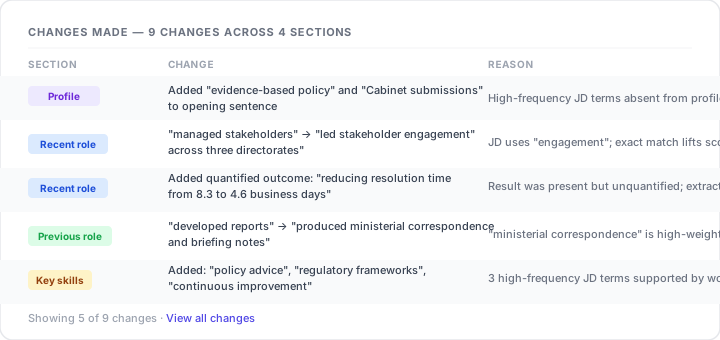
This matters for two reasons. First, you can audit every change before using the rewritten resume — nothing gets added without you seeing exactly what changed and why. Second, reviewing the changes teaches you the vocabulary of the role, which helps in the interview.
Step 6: The ATS Score (After)
Once the rewrite is complete, the revised resume is scored against the same job description using the same algorithm. You see both scores side by side.
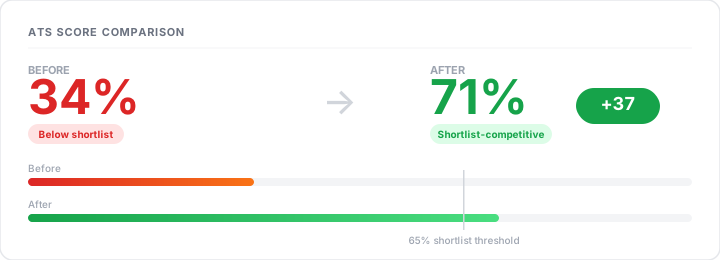
Most users see their ATS score increase by 25–40 percentage points in a single pass. Moving from 34% to 71% means moving from the decline pile to the shortlist-competitive range.
Step 7: Band Alignment Narrative
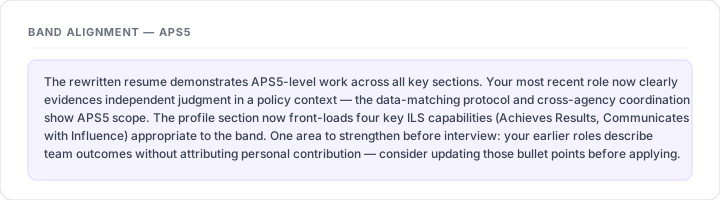
APS selection panels don't just look for keywords — they assess whether your resume demonstrates work at the level of the target band. An APS6 resume needs to show judgment, scope, and complexity appropriate to APS6, not APS4.
The rewriter produces a short narrative assessment of how well the rewritten resume demonstrates work at your target band level, and what (if anything) still needs strengthening.
Optional: Cover Letter
If you select the cover letter module, Role Ascent generates a 400–500 word cover letter specific to the role and agency. Not a generic template — a letter that references the job description directly, addresses 2 of the ILS capabilities with concrete evidence from your resume, and avoids the clichés that make hiring panels skim past.
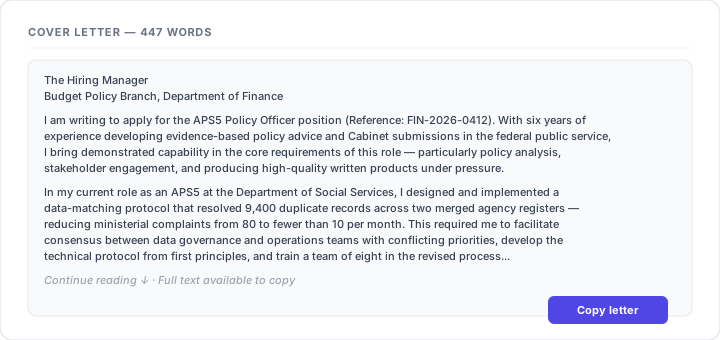
The letter is generated alongside the resume rewrite in the same analysis pass — no extra steps.
Optional: Selection Criteria Responses
For roles that require selection criteria responses (increasingly common for EL1 and EL2 roles, and still standard at some agencies), the tool generates a full STAR-structured response for each criterion extracted from the job description.
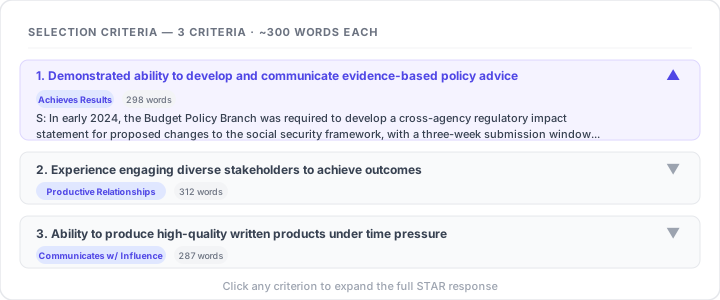
Each response is structured as:
- Situation — the context and what made it challenging
- Task — your specific accountability
- Action — what you personally did (the largest section, using "I" throughout)
- Result — the outcome, quantified where possible
Word counts are calibrated to your target band: APS3–4 responses run ~200 words, APS5–6 run ~300, EL1 runs ~400.
What You Do With the Output
Everything is generated as plain text you can copy directly into PageUp or your Word document. There's no export button to click, no formatting to undo — just text you can paste.
The full analysis — resume, scores, gaps, cover letter, criteria — is saved to your account. You can revisit it any time from your dashboard, and run a new analysis for a different role from scratch.
Who It's For
The Resume Rewriter is built for APS applicants who know what they've done but struggle to translate their experience into the language APS selection panels are looking for. If you've had your application declined without feedback, if you've never made a shortlist for roles you're qualified for, or if you're applying to your first APS role — this is where to start.
Ready to put this into practice?
Role Ascent optimises your resume, builds STAR stories, and prepares you for panel interviews — tailored to the exact job description. Try every tool free, no card required.
Try every tool free →Role Ascent Team
Writing about APS careers, interview preparation, and resume strategy for Australian Public Service applicants.
Related articles